

Do you usually use Google telecommunication for chatting to your friends? As far as I have known, we have chat services integrated into Gmail. Now it is called classic chat with gmail. Google users are moving to Handout, which is installed Gmail and Google+. There are some different ways to format chatting text of both of the two services.
Table of Contents
1. With classic chat integrated into Gmail
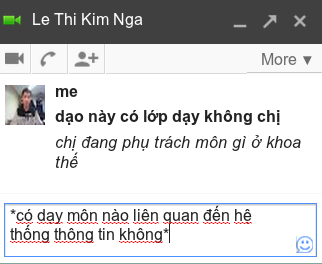
Use as the following:
- _italics_
- *bold*
2. With Hangout
Format your messages
You can use the following keyboard shortcuts before you type a new message to add formatting.
| Action | Windows | Mac |
|---|---|---|
| Bold | Ctrl + b | ⌘ + b |
| Italicize | Ctrl + i | ⌘ + i |
| Underline | Ctrl + u | ⌘ + u |
 Close a Hangout window Choose the Hangout window you’d like to close and press Esc. Minimize all Hangouts windows simultaneously You can minimize all of your Hangouts windows at the same time only if you are using the Hangouts Chrome extension.
- For Mac OSX: Press Shift and click the minimize button in one of the windows.
- For Windows and Linux: Press Ctrl and click the minimize button in one of the windows.
Move between Hangout windows
Move to next Hangout window: Ctrl + . Move to previous Hangout window: Ctrl + ,
