

Thực ra khái niệm chính xác: tạo bí danh cho các lệnh. Tuy nhiên, khái niệm bí danh alias khó hiểu nên tôi muốn giải thích rõ hơn trước khi đi vào tìm hiểu chi tiết cách tạo những lệnh tắt (variant).
Lấy một ví dụ minh họa như sau:
Lệnh ls sử dụng thường xuyên. Nếu ls không có tham số sẽ hiện thị nội dung trong thư mục hiện tại theo dạng ngang, chỉ tên tập tin và thư mục. Tuy nhiên, nếu cần hiển thị thông tin chi tiết về ngày giờ tạo tập tin (hoặc thư mục), quyền hạn, người sở hữu nội dung đó v.v… thì bạn phải thêm các tham số, ví ls -Bhl. Tôi đặt tình huống: thường sử dụng ls -Bhl nên muốn gõ nhanh thay vì phải gõ đầy đủ như thế thì ll (2 chữ l) hoặc l (1 chữ l) thay chẳng hạn.
Để làm như thế ta có thể thực hiện bằng lệnh alias:
alias ll="ls -Bhl"
Tại Terminal, bạn chỉ việc gõ ll là thực hiện được ls -Bhl. Thực chất khi gõ lệnh ll, máy tính sẽ gọi lệnh ls -Bhl. Vì vậy mà ll được xem như là một bí danh của ls -Bhl.
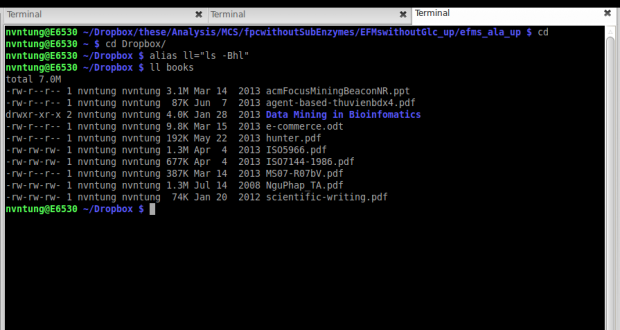
Lệnh alias có tác dụng trong phiên bản làm việc của Terminal ngay sau đó. Trong trường hợp mở một Tab mới hoặc New Terminal thì bí danh đó không có hiệu lực (không sử dụng được). Vì vậy, thông thường người ta sẽ đặt các bí danh trong các file ~/.bashrc hoặc ~/.bash_profiles. Sau đây là một ví dụ minh họa:
# http://www.tldp.org/LDP/abs/html/sample-bashrc.html
#============================================================
#
#  ALIASES AND FUNCTIONS
#
#  Arguably, some functions defined here are quite big.
#  If you want to make this file smaller, these functions can
#+ be converted into scripts and removed from here.
#
#============================================================

#-------------------
# Personnal Aliases
#-------------------

alias rm='rm -i'
alias cp='cp -i'
alias mv='mv -i'
# -> Prevents accidentally clobbering files.
alias mkdir='mkdir -p'

alias h='history'
alias j='jobs -l'
alias which='type -a'
alias ..='cd ..'

# Pretty-print of some PATH variables:
alias path='echo -e ${PATH//:/\\n}'
alias libpath='echo -e ${LD_LIBRARY_PATH//:/\\n}'

alias du='du -kh'    # Makes a more readable output.
alias df='df -kTh'

#-------------------------------------------------------------
# The 'ls' family (this assumes you use a recent GNU ls).
#-------------------------------------------------------------
# Add colors for filetype and  human-readable sizes by default on 'ls':
alias ls='ls -h --color'
alias lx='ls -lXB'         #  Sort by extension.
alias lk='ls -lSr'         #  Sort by size, biggest last.
alias lt='ls -ltr'         #  Sort by date, most recent last.
alias lc='ls -ltcr'        #  Sort by/show change time,most recent last.
alias lu='ls -ltur'        #  Sort by/show access time,most recent last.

# The ubiquitous 'll': directories first, with alphanumeric sorting:
alias ll="ls -lv --group-directories-first"
alias lm='ll |more'        #  Pipe through 'more'
alias lr='ll -R'           #  Recursive ls.
alias la='ll -A'           #  Show hidden files.
alias tree='tree -Csuh'    #  Nice alternative to 'recursive ls' ...

#-------------------------------------------------------------
# Tailoring 'less'
#-------------------------------------------------------------

alias more='less'
export PAGER=less
export LESSCHARSET='latin1'
export LESSOPEN='|/usr/bin/lesspipe.sh %s 2>&-'
                # Use this if lesspipe.sh exists.
export LESS='-i -N -w  -z-4 -g -e -M -X -F -R -P%t?f%f \
:stdin .?pb%pb\%:?lbLine %lb:?bbByte %bb:-...'

# LESS man page colors (makes Man pages more readable).
export LESS_TERMCAP_mb=$'\E[01;31m'
export LESS_TERMCAP_md=$'\E[01;31m'
export LESS_TERMCAP_me=$'\E[0m'
export LESS_TERMCAP_se=$'\E[0m'
export LESS_TERMCAP_so=$'\E[01;44;33m'
export LESS_TERMCAP_ue=$'\E[0m'
export LESS_TERMCAP_us=$'\E[01;32m'

#-------------------------------------------------------------
# Spelling typos - highly personnal and keyboard-dependent :-)
#-------------------------------------------------------------

alias xs='cd'
alias vf='cd'
alias moer='more'
alias moew='more'
alias kk='ll'
Tài liệu tham khảo
[1] Use alias to create shortcuts for commands, truy cập ngày 23-04-2014.
[2] Sample bashrc, truy cập ngày 23-04-2014.
